
Sultans of Swing (cover)
In the early 2000s, I played a keyboard in a band. We practiced on every Tuesday night for three hours. During short breaks, our guitarists liked to jam and generally fool around by playing guitar solos from the Dire Straits’ and Mark Knopfler’s hits. They taught me the chords and I really liked the finger-picking playing style, the melodies, and overall feeling of Mr. Knopfler’s music. I have been listening him a lot since then.
The original version
Sultans of Swing is one of the greatest hits of the Dire Straits. It’s an old song. Coincidentally, it was released the same year I was born - in 1978. Good year.
The solo’s of the Sultans of Swing were my absolute favourite. As many learning guitarists, I have struggled a lot in learning to play them. Check out how Mark himself plays and sings the song. It looks so easy and almost a bit aggressive how he handles the instrument. Love those vibratos!
Learning to play the song
During the years, Youtube became very useful as a platform for teaching (and learning) guitar tricks. For me, Justin Sandercoe’s Justin Guitar channel’s lessons were extremely helpful. His videos unlocked the secrets of this song. Thanks, Justin!
I learned all the licks from his Sultans of Swing videos 1-4. That last, speedy lick that everybody wants to master (in video 4) is still quite difficult for me!
To learn other songs written by Mark Knopfer, there’s a great fan-made resource called The Mark Knopfler Songbook by Pavel Fomenkov. At the time of writing this, there’s 57 songs covered with video instructions. Wonderful work, check it out:
The Mark Knopfler Songbook (new tab)
Sultans of Swing is an exception in Pavel’s catalogue - of course, he’s made a video of this song. But it is not a tutorial on how to play the song, it is a video about his thoughts about the song. I find it quite interesting.
Lyrics & vocal track
Lyrics are copyrighted material so I won’t publish them here. However, you can easily find them with a simple Google search (new tab)
If you’d like to listen Mark’s original vocal track (without any instruments), here it is. You can hear every breath he takes, it’s weird but interesting. Quite simplistic, actually.
Score and tabs
You can buy the score pretty cheap for example from here:
Sultans of Swing on Sheet Music Direct (new tab)
I have bought it, but to be honest, it is not really worth it. There’s only three pages and the preview of the first page pretty much reveals all there is to find. Furthermore, the vocal track of this song is something between speaking and singing. Seeing the melody line written as notes is not as important as usually.
For guitarists, you’d probably want the chords and tabs with strumming instructions and lyrics. Basically, this is all you need:
Sultans of Swing on Ultimate-Guitar (new tab)
Guitar backing track
A backing track, where the instrument you play has been removed, is really useful when practicing. It sounds so much better when you play with the real, original band. Moreover, you have to keep the tempo up throughout the song - also during the fast, difficult passages!
There’s pleanty of backing tracks for this song, but I think this one is the best:
Sultans of Swing on Guitar Backing Track (new tab)
I usually download the backing tracks from this site as .mp3 files and then play them from an iPad to the home stereo amplifier, while the guitar is connected to a separate guitar amp.
Some amazing covers
There are lots of covers of this song on Youtube. One of my favorites is Josh Turner’s version, where he beautifully accompanies himself and also plays the solos with a second guitar (it’s a multi-track recording).
Here’s another, very skillful cover by the Overdriver Duo, played with two ukuleles. And yes, her thighs do look nice, pretty sure it’s filmed like this on purpose… Just focus on the music, will ya! Before seeing this, I’ve considered ukulele more like a toy than a real musical instrument. Apparently, in skillful hands you can create great sounds with it.
Let’s take one more. Here’s a metal cover by Leo Moracchioli, featuring the wonderful Mary Spender. I think Leo sometimes goes a bit too far with that metal guy attitude, but hey, this video is quite humorous anyway and 24 million people cared to watch it, so who am I to judge.
There’s pleanty more on Youtube. Sultans of Swing seems to be a song that is loved by many generations of music lovers and guitarists, and it also inspires people in creating covers with all kinds of playing styles.
Motivation - the COVID-19 quarantine
In April 2020, everyone was instructed to stay at home and were looking for ways to pass time. Re-creating works of art at home became a thing. People were very creative, using whatever things they had at hand, and posed in front of a camera in a way that resembled a famous portrait.
A collection of home-made quarantine art at My Modern Met (new tab)
All of this reminded me of my old wish to one day record Sultans of Swing as a 360-degree video where I’d play all the instruments. I thought, music is a form of art, too, so why not re-create this old hit with whatever instruments and skills I had NOW. I’m never going to be “good enough” guitarist anyway.
Recording audio
So, I went to work and recorded cajon (bass/snare drums), bass guitar, acoustic guitar, electric guitar, and the guitar solos with Ableton Live, track by track.
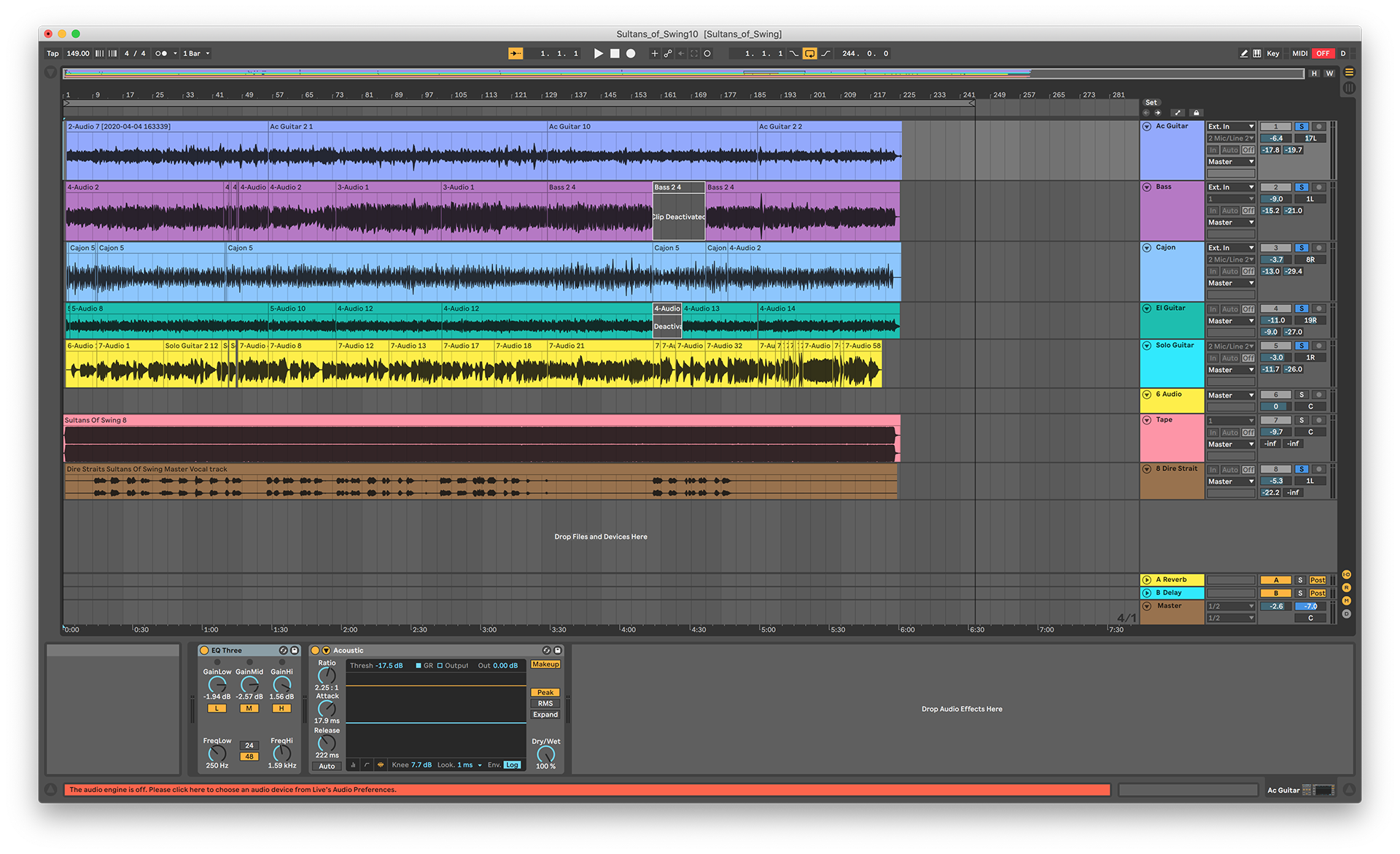
To stay in the tempo of the original version (which, by the way, is NOT stable!), I used the original version as a background track and then played the bass and cajon on top of that. Then I muted the track that contains the original version and played the rest of the instruments on top of my own tracks. Finally, I added Mark’s vocal track, which now matched with the tempo of my playing.
I used an old T-Bone condenser microphone for recording cajon and the acoustic guitar. Both electric guitars were recorded by placing the same microphone in front of the guitar amp speaker element. The bass guitar was recorded straight through the Focusrite Scarlett 18i8, which I used as an audio interface for my old Macbook Pro.
The tracks were mixed in Ableton Live using its standard effects. Mostly EQ, compressor, and reverb. Finally, I exported the audio as an .mp3 track.
Recording Video
Obviously, it is not possible to record myself playing all of these instruments all at once. Just like the audio track was created by mixing together separate takes, also the video track had to be created this way. As a camera, I used Insta360 ONE X, which is a great consumer level 5.7k 360-degree camera for less than $400 and comes with good software.
Once satisfied with the audio track, I put the 360-degree camera on a stand at the center of the room, put the music on, and recorded a video track of myself playing one instrument, using the music as the backing track so that I could stay in the correct tempo. Then I moved to a different position in the room, and recorded myself playing another instrument. I repeated this approach, until I had all five instruments captured on camera.
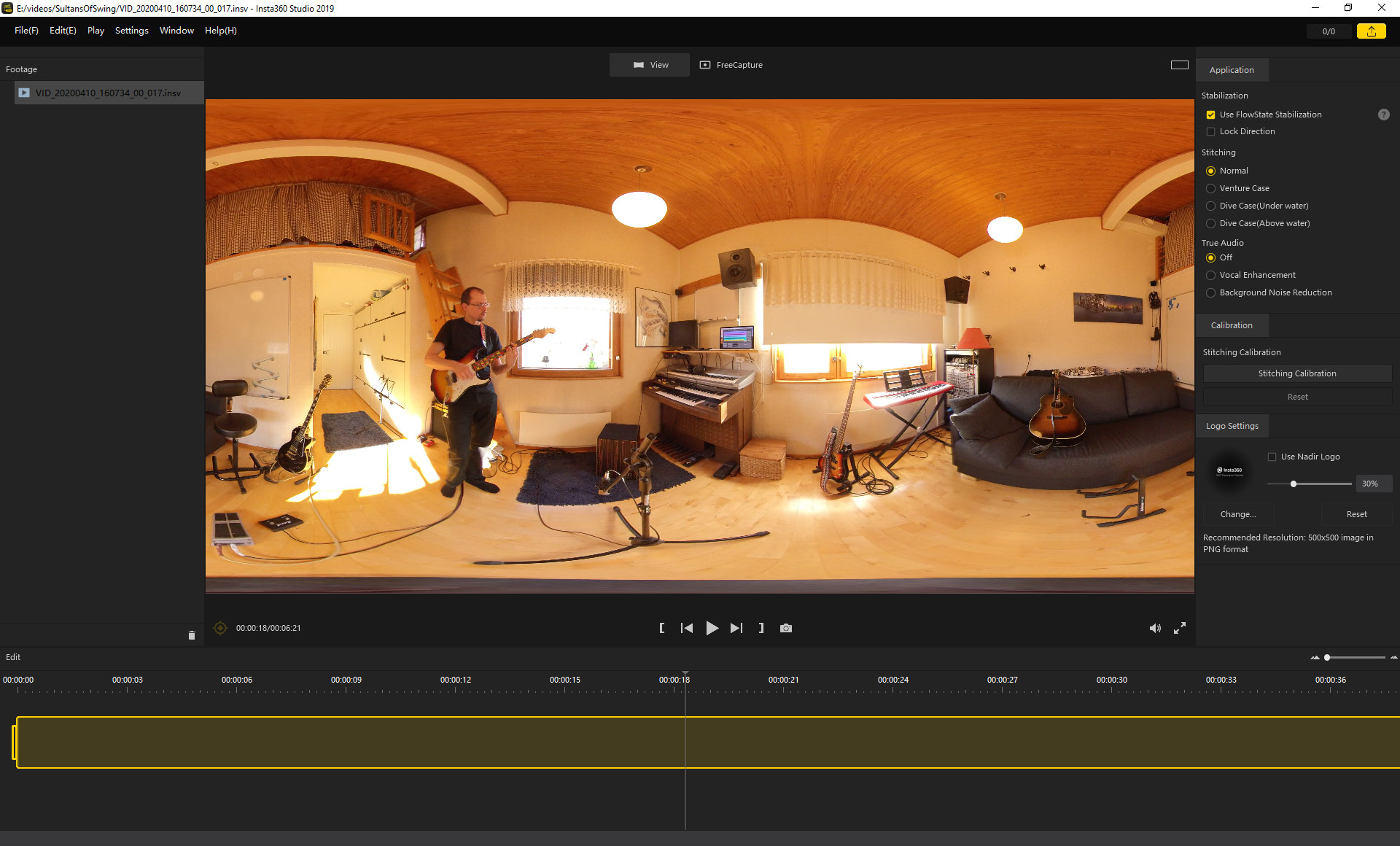
Because of the complexity of this working style I didn’t even try to record the audio and video of a single instrument at the same time. As a result, you may notice some mismatches between audio and video in the end result - I didn’t remember how exactly I played a particular instrument anymore when I captured the same instrument on video.
Edit
I used Adobe Premiere for merging the 360 videos together in such a way that all five copies of me appeared at the same time. If you want to learn how, there is a great “Shadow Clone Tutorial” video in the Insta360’s mobile app. In short:
- Put the camera in the center of the room and do not move or turn it around.
- Capture every clone doing its thing.
- Use Insta360 Studio application for exporting a video clip of each clone into a separate video file (use the equirectangular projection).
- Import the clips into Adobe Premiere and use the pen tool to draw an area around the section that you want to keep from a particular video track. The background comes from one of the clips where you don’t draw anything with the pen.

After this, I exported the project into a single video clip and re-opened that file in Premiere. Then, I added the audio track and now I had a 360-degree video cover of the Sultans of Swing. Finally, I did the usual color grading, titles etc. video edit tasks.
You can get a free 7-day evaluation version of Adobe Premiere, if you don’t have it. That’s more than enough time for trying out making a video like this.
360 version
I have made several versions of the video. Here’s a 360-degree video with a short background story before the music and forced perspective:
This is a 360-degree video - you can use touch, mouse or WASD keys for panning the view by dragging.
Since many viewers wont’ notice the possibility to pan especially on Facebook shares, I added a few forced camera angle changes. However, that turned out problematic, as some of the clones stand and some sit, so I had to adjust the pitch angle, too, to keep every player’s face within the vertical image area. Which, of course, messed the floor leveling! Making forced perspectives in a 360-degree video is always controversial… you really should not touch pitch and roll angles, only yaw.
On the other hand, fusing the clones together into the same image worked really well. Also, lighting and shadows did not cause problems at all. I assumed that would have been a major headache. Recording the video inside on a perfectly sunny day helped a lot because there was constant, bright light from the windows throughout the recording session.
The space was tight to get five players in the same room, but in the end that worked, too. It was paramount to have enough space around each player, else merging them together would have needed a lot of masking work in the edit. Of course, I did some planning and tested this before actually capturing the video.
VR version
This version is intended for VR headsets / active panning viewing style i.e. there is no forced perspective. I have also omitted the background story; it’s just the music part.
This is a 360-degree video - you can use touch, mouse or WASD keys for panning the view by dragging.
Re-framed 2D version
Since some devices (iPhones and iPads, mainly) still cannot play 360-degree video in a browser, I made another version as a re-framed 360-degree video. No background story, just the music part.
This is a kind of director’s cut, where camera angles are hand-picked by me from the 360-degree video. The output is a regular 2D video. Using the 360-degree camera as a source allowed using some extraordinary camera angles! Here’s the second version.
I created this version by importing the video from Premiere back to Insta360 Studio, where I used the free-form mode for locking the view to specific settings at specific points of time, and letting Insta360 Studio to perform a transition effect of my choice between any two points.
Sounds complicated, but is actually very intuitive and effective. As a result, you get a video that looks like there was pleanty of cameras and crew of cameramen - all from a single 360-degree camera that was just attached to a stand. That’s actually quite amazing!
For both of my videos, the copyright has, of course, been claimed via Youtube by the copyright owner of the song. I am not making any money out of this. It is just for fun and one more tribute to this evergreen song by Mr. Knopfler.
Postscript
This hobby project was really fun and I enjoyed a lot making it. There are a few things that I’d do differently next time:
- A larger room would help as each of the clones would have more space and could move a little.
- Using different clothes, sunshades etc. for each clone could be a good idea.
- Maybe some smalltalk and facial expressions? Well, I am Finnish ie. naturally born silent stone face…
- Recording audio and video of a single instrument simultaneously would be nice.
- More than one 360-degree camera would allow changing the vantage point, e.g. close-up of the lead guitar.